

IT and Server Relocation in Dubai
Moving office computers, servers, and network equipment requires careful handling, documentation, and coordination to ensure smooth system restoration. Office Mover Dubai manages complete IT relocations, from workstation setups to server racks—offering inventory labelling, antistatic protection, safe transport, and structured placement. Planned during evening or weekend downtime, relocations include pre-agreed shutdown, backup, and testing procedures for seamless continuity.
- Office workstations, server racks, and network hardware relocated under one coordinator
- Equipment inventory, matching cable identification, and antistatic protective packing
- Planned evening and weekend relocations scheduled around building access and your downtime window
- Every cable photographed
- Same crew disconnects & reconnects
- 1 weekend Most server rooms
- Backups verified first
- Anti-static ESD packing
- GPS-tracked, climate-managed trucks
- Network tested before sign-off
- Works with your IT team or MSP
- NOC & permits filed for you
- Insured load-out to load-in
- Licensed by Dubai Municipality
- Every cable photographed
- Same crew disconnects & reconnects
- 1 weekend Most server rooms
- Backups verified first
- Anti-static ESD packing
- GPS-tracked, climate-managed trucks
- Network tested before sign-off
- Works with your IT team or MSP
- NOC & permits filed for you
- Insured load-out to load-in
- Licensed by Dubai Municipality
What's included
What Does IT and Server Relocation Include?
IT and server relocation covers the structured preparation, physical protection, documented transport, and destination placement of workplace technology. Rather than treating computers and server racks like general office furniture, we manage the IT move against a documented inventory and agreed sequence.
Our IT relocation services cover
-
01
Office IT & Workstation Relocation
We relocate complete employee workstation setups, including desktop PCs, dual or triple monitors, monitor arms, docking stations, IP phones, desktop printers, and peripheral accessories. Each workstation is identified, with cables and smaller accessories bagged and labelled to match your destination seating plan so equipment is placed at the right workstation at the new office.
-
02
Server Room Relocation
Server room relocation involves more than moving racks and cabinets. Rack-mounted servers, patch panels, network switches, and storage hardware are identified, labelled, and transported according to an agreed relocation plan. We coordinate the physical un-racking, transport, and re-racking of server room equipment with your IT team or appointed technical specialist, with shutdown procedures, backup checks, rack layouts, and testing responsibilities defined before the move.
-
03
Network & Storage Hardware Relocation
Core infrastructure, including network switches, routers, firewalls, patch panels, SAN and NAS storage arrays, and UPS systems and battery units, subject to equipment-specific isolation, battery safety, and transportation requirements, is documented prior to disconnection, packed with appropriate electrostatic discharge (ESD) and impact protection, and positioned at the new site to match your rack elevation or floor diagram.
-
04
Data Centre & Rack Equipment Relocation
Relocating rack cabinets, servers, storage systems, and associated hardware between commercial offices, colocation facilities, or local data rooms requires a detailed pre-move assessment of origin and destination readiness, floor loading, lift dimensions, and transport logistics. Where specialist system migration, network reconfiguration, electrical work, or engineering commissioning is required, those responsibilities and qualified technical providers are confirmed separately in writing before the project begins.
-
05
Specialized IT Equipment Transportation
We arrange protective packing and enclosed commercial vehicle transport for office computers, monitors, servers, and networking hardware. Each item is assessed for handling requirements, available manufacturer packaging, antistatic wrapping, and shock-absorbing cushioning. Equipment is loaded, restrained against movement, and checked off against your relocation inventory at both collection and delivery. Any requirements for dedicated vehicles, environmental controls, or additional transit insurance are reviewed and confirmed during quotation.
IT Relocation
Why Does IT Relocation Require Specialized Handling?
Office IT equipment includes sensitive electronic components, high-value hardware, and business-critical systems that must return to service in a specific configuration. Unlike standard office furniture, moving IT infrastructure requires documented cable mapping, controlled shutdown preparation, appropriate packaging materials, and coordinated technical handovers.
Equipment Identification and Cable Documentation
Servers, switches, storage devices, and desk setups should be recorded before a single cable is unplugged. Asset labels, port mapping records, and pre-disconnection reference photographs help the technical team identify exactly how devices and patch panels reconnect at the destination.
Antistatic and Impact Protection
Internal drives, circuit boards, display panels, and rack chassis are vulnerable to both physical vibration and electrostatic discharge. The packing method is matched to each item's sensitivity, weight, and manufacturer handling guidelines rather than relying on general household wrapping.
Planning Around Business Operations
IT relocation schedules must account for the systems your staff rely on daily, upstream and downstream hardware dependencies, building access hours, and the time your technical team needs for reconnection and verification before normal working hours resume.
Coordination With Qualified IT Personnel
System shutdowns, data backups, firewall and network configuration, and live application testing are agreed with your internal IT representative, managed service provider (MSP), or designated technical specialist before moving day. The goal is a controlled relocation with clear accountability at every step.
Minimizing downtime
How Do You Minimize Downtime During Server Relocation?
Server and network downtime depends on the complexity of your environment, the readiness of your destination server room, and the technical checks required before staff can log back in. While physical equipment relocation requires a planned outage window unless you maintain redundant live infrastructure, careful preparation helps avoid unnecessary delays.
5 Steps to minimize relocation downtime
-
01
Planned Shutdown and Restart Sequence
Your IT team identifies which servers, storage arrays, and switches depend on one another so hardware is powered down, transported, and brought back online in the right priority order.
-
02
Evening and Weekend Relocations
Scheduling server relocation during agreed evening or weekend windows can reduce disruption to normal business operations. We coordinate crew availability, building access and transportation around the downtime window approved by your IT team.
-
03
Destination Readiness Checks
Power outlets, PDU capacity, ISP circuits, patch panels, rack cooling, and server room access at the new office should be confirmed active and ready before hardware leaves the current site.
-
04
Backup and Recovery Preparation
Your designated IT personnel complete and verify system backups and configuration exports prior to disconnection so a clear recovery path exists before any hardware is moved.
-
05
Phased Equipment Relocation
Where your operational setup and timeline allow, non-essential workstations or secondary equipment can be moved in stages so core infrastructure stays active until the primary cutover window.
IT Coordination
Who Handles Server Shutdown, Backups and Reconnection?
A safe IT relocation separates physical moving logistics from system administration and network engineering. Defining who performs each task before moving day prevents misunderstandings and protects your infrastructure.
| Relocation Stage | Moving Crew & Coordinator Responsibilities | Client IT Team / Qualified Technician Responsibilities |
|---|---|---|
| Before the Move | Reviews equipment counts, confirms packing specifications, checks building access and lift dimensions, and agrees on the physical moving sequence. | Reviews system dependencies, verifies that full data and configuration backups are complete and restorable, and prepares the shutdown and rollback plan. |
| During Disconnection & Load-Out | Labels hardware and cables against the inventory, applies antistatic and shock-protective packing, and loads equipment into the moving vehicle. | Performs controlled operating-system and hardware shutdowns, isolates power/UPS connections, and releases equipment for physical disconnection. |
| At the New Location | Unloads hardware, positions enclosures and workstations to the floor plan, re-racks servers as agreed, and routes labelled physical patch leads if included in scope. | Completes power-up sequences, verifies physical port connections, manages IP/network configuration, and runs system, database, and application testing. |
| Before Final Handover | Reconciles every delivered item against the master inventory list, clears packing materials, and completes the physical handover walkthrough. | Confirms hardware delivery condition, validates system connectivity and operational readiness, and signs off on technical completion. |
Need a clear division of responsibilities? Share your IT team's availability and our coordinator will draft a written responsibility matrix before the project begins, ensuring no overlap or gaps on moving day.
Request an IT Relocation QuoteRelocation process
What Happens During an IT and Server Relocation?
Our IT and server relocation process follows five coordinated stages, from equipment assessment and cable documentation to protective transportation and final handover. Each stage is planned around your hardware inventory, building access, and agreed downtime window, with technical responsibilities confirmed with your IT team before moving day.
-
01
Equipment Survey and Relocation Planning
We review your workstations, servers, racks, and network equipment to prepare a moving inventory and confirm handling requirements. Our coordinator checks equipment dimensions, access routes, service lifts, and the destination layout while agreeing on the moving schedule and technical responsibilities with your IT team.
-
02
Equipment Documentation and Cable Labelling
Before disconnection, servers, workstations, and network devices are identified against the inventory. Cable connections, rack positions, and associated accessories are photographed or recorded where authorized, with labels applied to help your technical team identify the correct equipment and connections during reinstallation.
-
03
Shutdown Confirmation and Protective Packing
Your designated IT personnel complete the agreed shutdown procedures and confirm backup preparations before releasing equipment for transport. Our crew then packs the hardware using suitable antistatic materials, shock-absorbing padding, and protective packaging according to each device's handling requirements.
-
04
Secure Transportation and Equipment Placement
Packed equipment is loaded, secured against movement, and transported to the destination according to the agreed schedule. On arrival, our crew checks delivered items against the inventory and positions workstations, server equipment, and network hardware according to the approved floor plan or rack layout.
-
05
Technical Verification and Final Handover
The designated IT team or qualified technicians complete the agreed reconnection, configuration, and operational testing. Our coordinator reconciles the physical inventory, records any outstanding handling issues, and completes the relocation handover with your authorized representative.
Permits & Access
Do You Coordinate Building Permits and Access for IT Moves in Dubai?
Office buildings, commercial towers, and free zones in Dubai often enforce specific regulations regarding equipment deliveries, service lift reservations, contractor access, and moving permissions. We review collection and destination building rules during the initial planning stage to coordinate access with your authorized representative.
-
01
Building NOCs and Moving Permissions
Many commercial properties require tenants to apply for a No Objection Certificate (NOC) or formal moving approval prior to the relocation date. We provide the applicable contractor documentation and insurance details required for the agreed move, where available.
-
02
Service Lifts, Loading Bays, and Access Windows
Transporting server cabinets and bulky hardware requires advance service lift bookings, designated loading bay access, and strict adherence to allowed delivery hours. We verify lift dimensions, access pathways, and site-specific handling restrictions well ahead of moving day.
-
03
IT Relocation Across Dubai and the UAE
Our team supports relocations across major commercial hubs in Dubai, including Business Bay, DIFC, JLT, Downtown Dubai, Deira, Al Quoz, Dubai Marina, Dubai Internet City, Dubai Media City, and Dubai Silicon Oasis. Inter-emirate relocation services involving Abu Dhabi, Sharjah, and other emirates are also managed based on your project schedule and hardware requirements.
Pricing & Quotes
How Much Does IT and Server Relocation Cost in Dubai?
The cost of IT and server relocation in Dubai depends on the equipment being moved, its handling requirements, the distance between locations, building access, and the technical services included in the project. Moving office computers and monitors requires different resources from relocating rack-mounted servers, storage systems, and network infrastructure.
6 Factors That Affect IT Relocation Costs
Equipment Quantity and Type
The number of workstations, monitors, servers, rack cabinets, network switches, and storage devices determines the inventory, packing materials, transport capacity, and handling resources required.
Hardware Weight and Complexity
Heavy server racks, UPS systems, and sensitive storage equipment may require additional handling personnel, appropriate lifting equipment, specialized packaging, or equipment preparation before transportation.
Technical Services Required
The scope may include equipment documentation, cable labelling, physical un-racking, transportation, and re-racking. Technical shutdown, network configuration, reconnection, and operational testing responsibilities must be confirmed separately with the designated technical team.
Relocation Distance and Building Access
Travel distance, loading-bay availability, service-lift dimensions, carrying distances, and moving permissions can affect the time and resources required.
Moving Schedule and Downtime Requirements
Evening, weekend, and phased IT relocations may involve additional planning, crew scheduling, or coordination with technical specialists to meet the agreed outage window.
Destination Infrastructure Readiness
Available rack space, power connections, cooling arrangements, and network readiness can influence the physical moving schedule and the technical work required after delivery.
Related services
Related Office Moving Services
If your IT and server move is part of a complete office relocation, our team can coordinate all connected workplace services under the same project plan and supervisor:

Commercial Relocation in Dubai
Comprehensive commercial relocation solutions tailored for Dubai businesses, handling full operational moves with minimal disruption, strategic scheduling, and secure transport of business assets.
Explore Commercial Relocation
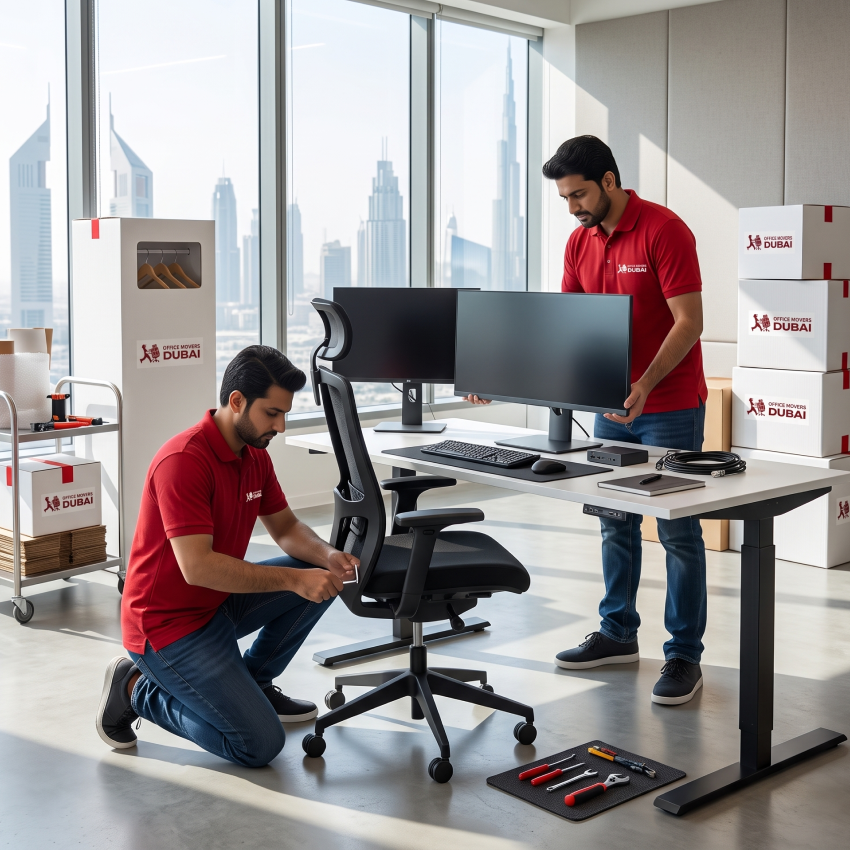
Office Furniture Installation
Professional dismantling, transport protection, and on-site reassembly of modular workstations, benching systems, partitions, boardroom tables, and office storage to your floor plan.
Explore Furniture Installation

Office Packing and Labelling
Systematic commercial packing using numbered inventory lists, colour-coded crate and box labelling, and protective wrapping for office files, stationery, and workplace equipment.
Explore Office Packing
The duration depends on the number of workstations and servers, cabling complexity, travel distance, required technical preparation, and building access windows. Smaller office IT moves can often be completed within a single day or evening. Server rooms and larger multi-department setups may require a weekend window, phased execution, or additional testing time. We confirm your expected schedule in writing after reviewing your inventory and site details.
Yes, weekend server relocations can be arranged when the project scope, destination readiness, technical preparations, and building access permissions support a weekend schedule. Before moving day, we agree on the exact window for system shutdown, physical transport, re-racking, and your IT team's testing and sign-off.
Data protection starts before any hardware is unplugged. Your internal IT team or designated technical specialist should complete and verify full data backups, system configuration records, and recovery procedures prior to disconnection. On the physical side, we use antistatic packing, shock-absorbing cushioning, restrained transport, and item-by-item inventory tracking, working alongside your agreed technical plan so hardware arrives safely.
We review your technical setup before quoting. In most relocations, we work alongside your in-house IT department or managed service provider (MSP), handling the physical labelling, packing, transport, and placement while your IT personnel control shutdowns, backups, and network configuration. If you require additional technical assistance for physical disconnection or reconnection, let us know so we can confirm the available scope in your written quotation.
Each device is matched to appropriate protective materials based on its size, weight, and sensitivity. This includes antistatic (ESD) wrapping for sensitive electronics, foam padding and protective sleeves for monitors and chassis, sturdy moving crates for peripherals and cabling, and secure strapping inside enclosed moving vehicles.
We help coordinate building access requirements with you and building management at both addresses. Because permit rules vary across Dubai towers and free zones, the tenant typically submits the official NOC request through the building or free-zone portal, while we supply our contractor trade licence, insurance details, and crew documentation and help schedule the loading bay and service lift windows.
Available transit insurance depends on the policy terms and the specific inventory being transported. Ask us for our insurance details before booking. We will explain the applicable coverage, policy limits, conditions, and exclusions in writing, and advise if high-value servers or specialist hardware require separate insurance arrangements.
Physically moving live servers requires planned disconnection and downtime unless your business operates redundant failover infrastructure or a separately engineered cloud/parallel migration. We help minimize operational disruption by scheduling physical moves during evenings or weekends and coordinating closely with your technical team's shutdown and restart plan.
Yes. We handle inter-emirate office IT and server relocations between Dubai, Abu Dhabi, Sharjah, and other UAE emirates. Share your equipment inventory, origin and destination buildings, and preferred moving date so we can review access and transport requirements and prepare a written quotation.